To install the extension, choose from the links below:
- Download Save Outlook Emails as PDF for Chrome
- Download Save Outlook Emails as PDF for Microsoft Edge
The dashboard is here: Save Outlook Emails as PDF – Dashboard
- Introduction
- Watch a quick overview
- How to install Save Outlook Emails as PDF
- How to use Save Outlook Emails as PDF
- How to configure Save Outlook Emails as PDF
- Downloading and Sharing
- How to configure Save Outlook Emails as PDF for Teams
- FAQ and Troubleshooting
Introduction
cloudHQ’s browser extension Save Outlook Emails as PDF enables you to save Microsoft Outlook emails to PDFs with just one simple click. It works on Outlook.com, Outlook on the Web, and Microsoft 365 Outlook, and supports both personal Outlook accounts (outlook.com, hotmail.com, live.com) and work Microsoft 365 / Office 365 accounts.
Watch a quick overview
How to install Save Outlook Emails as PDF
To get started with Save Outlook Emails as PDF, follow these steps:
- Go to: https://chromewebstore.google.com/detail/kaaighlomlcdpbloblhgaaghjbjbpoib (for Chrome) or https://microsoftedge.microsoft.com/addons/detail/lghkebmkaglpfinjfiaaeoohopgkehpd (for Microsoft Edge).
- Click the Add to Chrome button (or Get button on Edge):

- When prompted, click Add extension button:

- After the extension is installed, open your Outlook web mailbox (outlook.live.com, outlook.office.com, or outlook.office365.com). A welcome window will open describing how to use the extension — click on Create Account when prompted to link your cloudHQ account.
Once you create an account (signed in with your Microsoft identity), you’ll be able to start using the app.
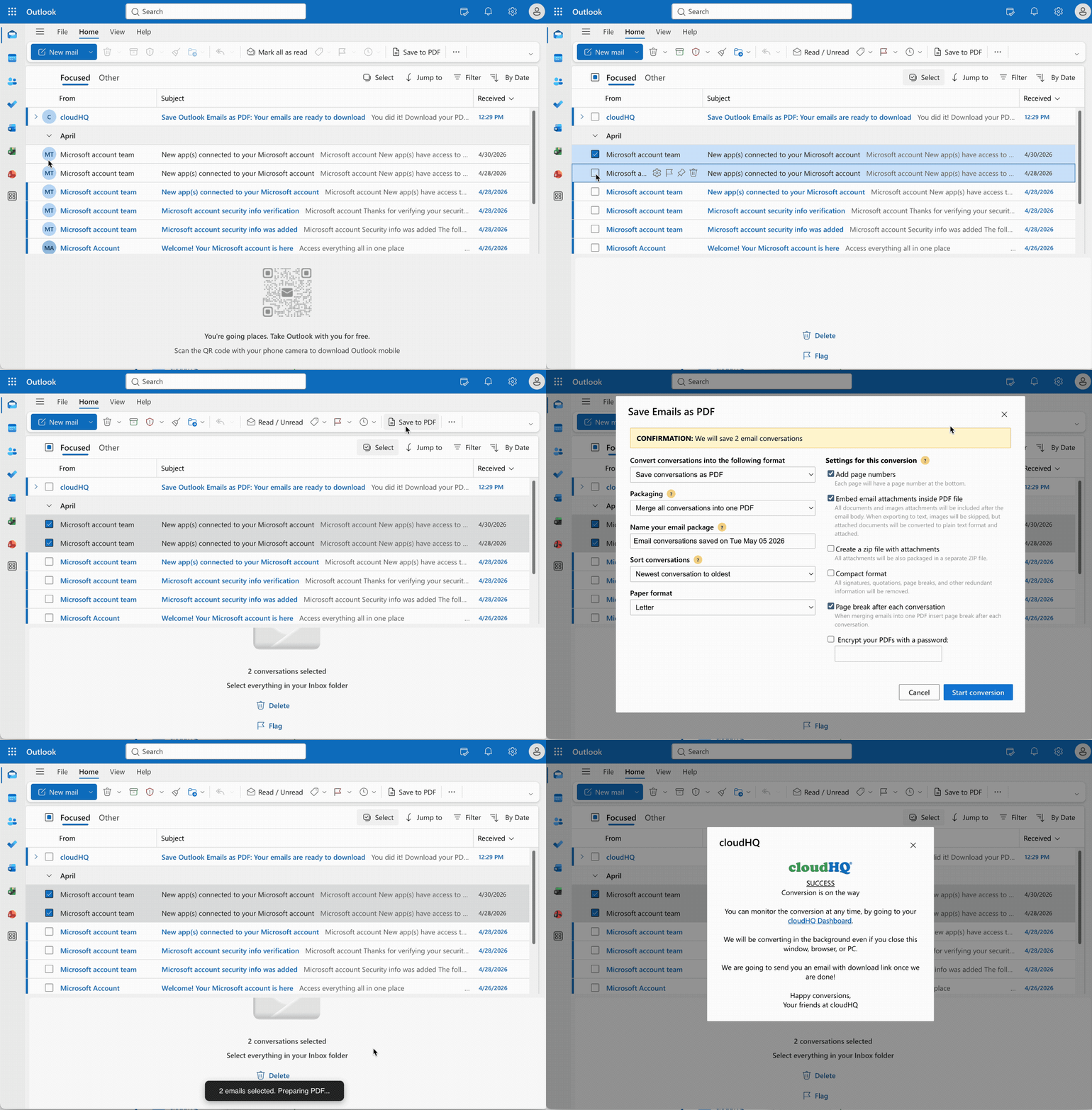
The following GIF shows how to save selected Outlook emails to a PDF document — select the emails in your Outlook list and click the Save to PDF button on the Home tab of the Outlook ribbon:
How to use Save Outlook Emails as PDF
- How to save and convert a single Outlook email to a PDF
- How to save multiple Outlook email messages as PDF
- How to save all messages in an Outlook folder (and subfolders) to PDF
- How to back up or save an Outlook folder (or your entire mailbox) to a PDF document using the wizard
How to configure Save Outlook Emails as PDF
Downloading and Sharing
- How to share a package created by Save Outlook Emails as PDF
- How to download packages created by Save Outlook Emails as PDF
How to configure Save Outlook Emails as PDF for Teams
FAQ and Troubleshooting
save outlook emails as a pdf file; How to convert outlook email to PDF; Save As PDF Add-In for Outlook; save outlook email as pdf; How to Save Outlook as a PDF Document; Save Outlook.com emails as PDF; Save Microsoft 365 emails as PDF